Designing a biosample search platform for research scientists
My role
UX Designer
Year
2021 – 2020
Project details
Client
Roche
Sector
Pharmaceuticals
Project team
Small product team including a Project Manager and a Visual Designer.
Timeline
4 weeks
Overview
I led UX design for a biosample directory concept for Roche, helping research scientists search, assess and request biosamples from internal repositories.
The project explored how Roche could make better use of in-house biosamples by making them easier to discover and evaluate before scientists considered external acquisition.
The challenge was not simply to create a search interface. Scientists needed to make confident decisions based on specialised metadata, availability, provenance and sample condition. The experience needed to support both broad discovery and more precise filtering without overwhelming users.
My role was to define the information architecture, shape the search and request experience, prototype the concept, and help the team prioritise the MVP direction.
The problem
Research scientists were spending too much time searching for biosamples across fragmented repositories.
Because internal samples were difficult to find and assess, scientists could overlook existing in-house resources and request or purchase samples externally instead. This created unnecessary cost, duplicated effort and slower research workflows.
The product needed to make internal biosamples easier to discover, compare and request. But the domain was highly specialised, and the search experience had to reflect how scientists actually think about samples, not how systems happened to store them.
The main challenges were:
fragmented sample information across repositories
specialised scientific metadata
limited time with subject matter experts
the need to support both simple search and advanced filtering
the risk of overwhelming users with too many filters or unclear data
connecting discovery to request, approval and fulfilment
My role
I led the UX design process for the concept phase.
My work included:
facilitating workshops with stakeholders and scientists
understanding scientific search behaviours and domain language
mapping the end-to-end journey from discovery to request
defining information architecture hypotheses
running card-sorting and IA exercises
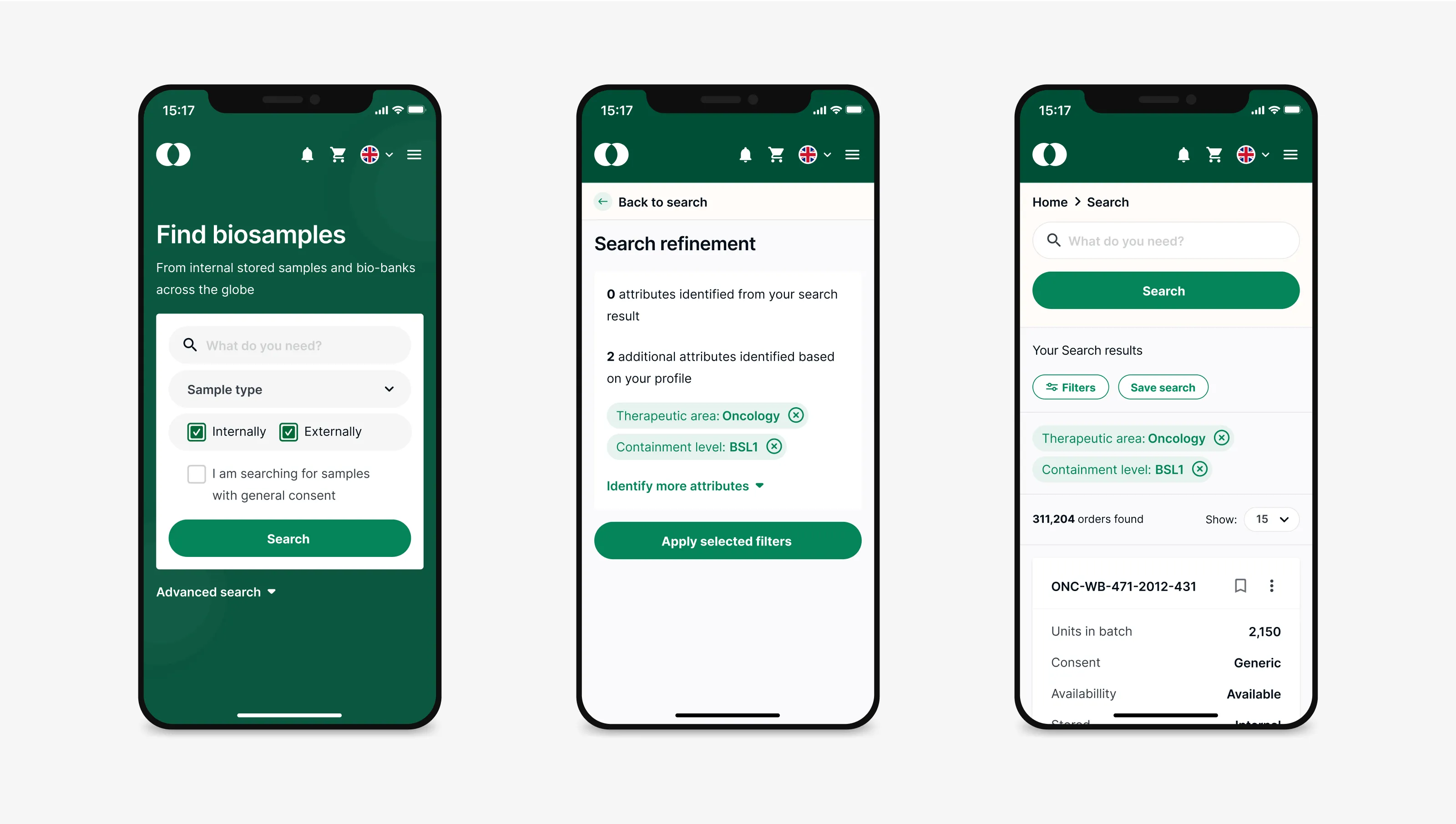
designing responsive wireframes and prototypes
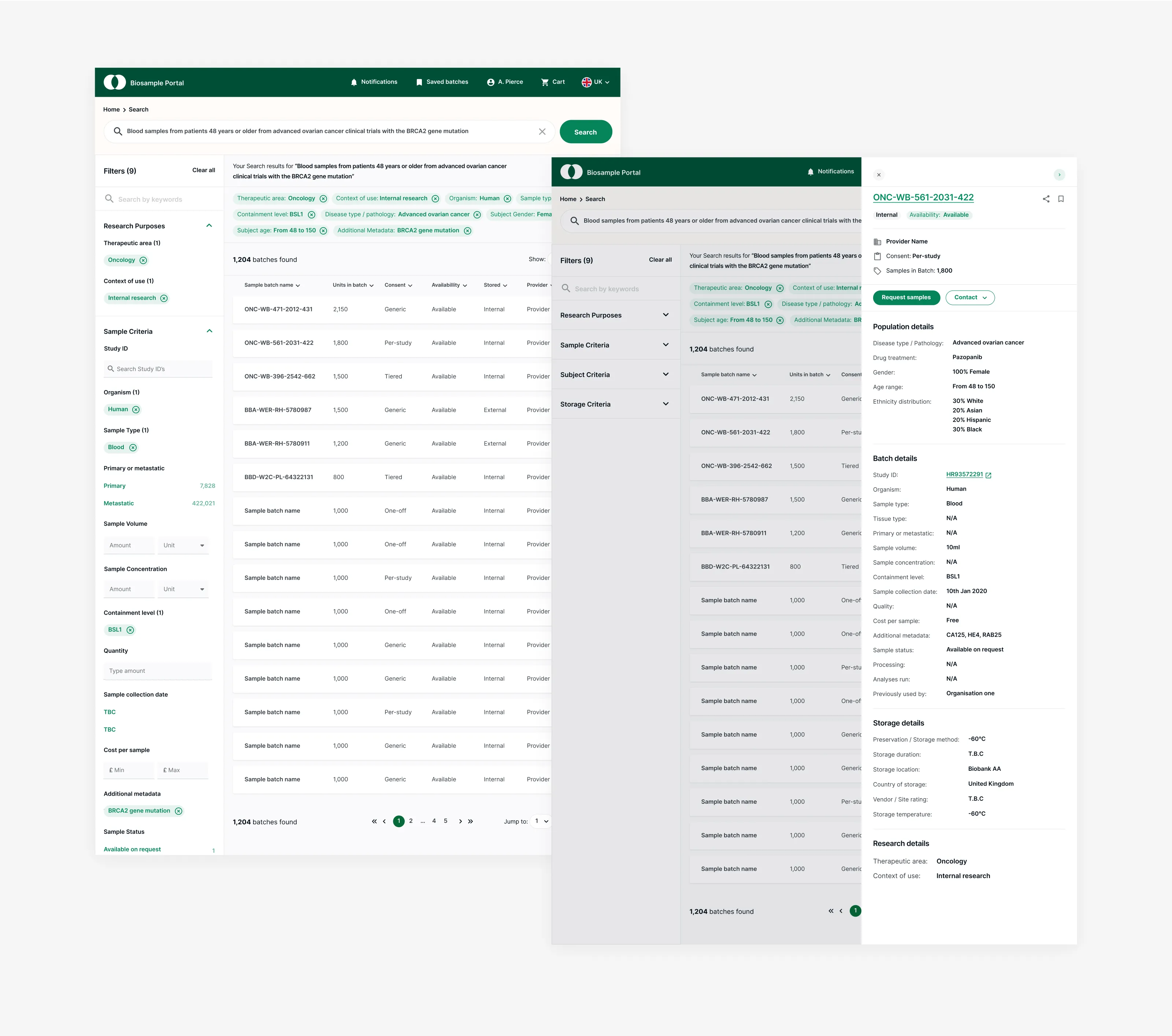
shaping search, filtering, sample detail and request flows
synthesising feedback into design decisions
helping prioritise MVP functionality and future opportunities
The project required me to quickly understand a specialised scientific domain and translate it into a clear, usable product direction.
Design approach
The main focus was to make sample discovery feel more structured and trustworthy.
Scientists did not just need a list of results. They needed to understand whether a sample was relevant, usable, available and worth requesting.
The design approach focused on three priorities:
findability; so helping scientists search and filter in ways that matched their mental models
confidence; so making metadata, provenance, condition and availability easier to assess
workflow continuity; so connecting search results to request, approval and fulfilment rather than treating discovery as a standalone task
Key design decisions
Anchor the information architecture in scientific workflows
The search experience needed to reflect how scientists categorise and evaluate biosamples. I structured navigation and filters around concepts such as sample type, condition, source and availability, rather than relying only on repository structure. This helped align the experience more closely with users’ mental models.
Balance broad search with advanced filtering
Different users needed different levels of depth. Some scientists wanted to start broadly and narrow down. Others needed precise parameters from the beginning. I designed a guided filtering model that surfaced common filters first, while keeping more advanced criteria available through progressive disclosure. This helped preserve depth without making the initial experience feel overloaded.
Make metadata easier to assess
Search results needed to communicate more than a sample name. I prioritised key metadata such as provenance, condition, availability and relevance signals so scientists could assess whether a sample was worth exploring further. The goal was to reduce wasted effort by helping users make faster, more confident decisions from the results page.
Connect discovery to request
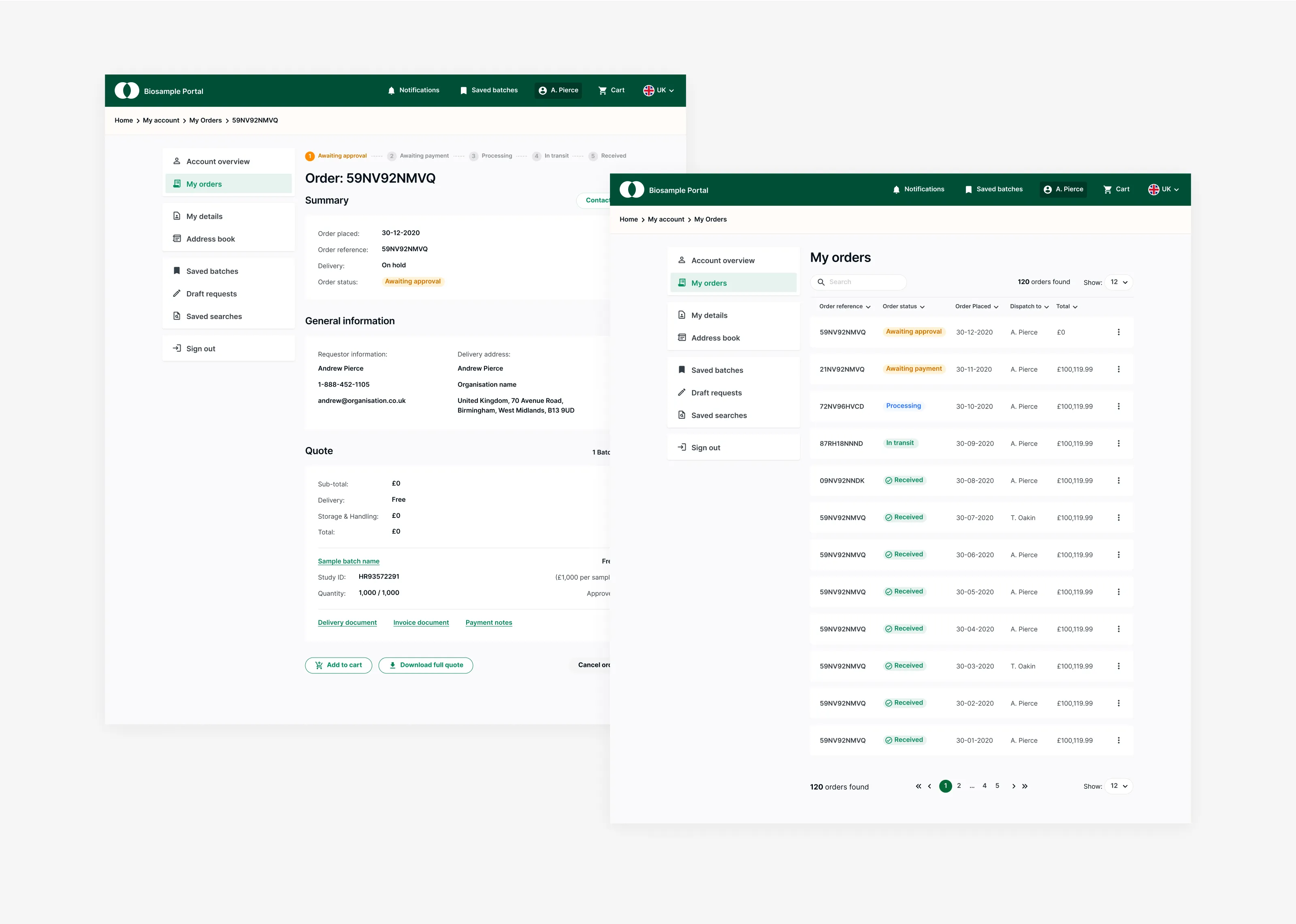
Finding a sample was only part of the workflow. The concept connected search and filtering to sample detail, request, approval and fulfilment steps. This helped show how the platform could support the full journey rather than becoming another disconnected repository interface.
Use prototypes to align scope and priorities
Because the project was short and the domain was complex, prototypes were essential for creating shared understanding. I used responsive wireframes and clickable flows to help stakeholders and subject matter experts discuss the journey, evaluate trade-offs and prioritise what should belong in an MVP versus later releases.
Research, testing and iteration
The design process combined workshops, domain review, card-sorting activities and prototype feedback.
Research helped clarify that scientists valued metadata clarity and confidence more than surface-level interface polish. They needed filters and result structures that matched scientific concepts, but too many filters without hierarchy could slow the experience down.
Feedback helped refine:
the structure of search and filter categories
which metadata appeared in search results
how sample detail pages supported assessment
how request and approval steps connected to discovery
which features should be prioritised for an MVP
The work was iterative and focused on reducing ambiguity quickly so the team could move from concept to a clearer product direction.
Outcome
The project delivered a validated concept, responsive prototype and prioritised MVP recommendations for a biosample search platform.
The work gave Roche a clearer view of how scientists could search, evaluate and request internal biosamples through a single experience. It also helped stakeholders align on the product direction, feature priorities and key workflow considerations before moving further into development planning.
I do not have post-launch metrics for this work, so I avoid overstating the impact. The clearest outcome I can point to is that the concept tested positively for clarity and usefulness, and gave the team a concrete product direction for improving internal biosample discovery and reducing unnecessary reliance on external acquisition.
What I learned
This project reinforced how important information architecture is in specialised domains.
When users are experts, the challenge is not to simplify the domain too much. It is to structure complexity in a way that matches how they think, search and make decisions.
It also showed the value of prototyping as an alignment tool. In a short project with specialised subject matter, prototypes helped turn abstract discussions into concrete product decisions.
Reflection
I chose this project because it shows my experience designing search and discovery experiences in a complex domain.
It required research synthesis, information architecture, interaction design, prototyping and the ability to translate specialist workflows into a product concept that stakeholders and users could evaluate.